


Technology is vital in enhancing patient outcomes and streamlining operational procedures in the dynamic healthcare environment. One noteworthy technological development in healthcare settings is software tailored for kiosks. The need for efficient, patient-centered solutions to handle the complexities of modern healthcare is becoming increasingly evident. This blog will look at the challenges and critical elements that need to be considered during the healthcare software development process and the intricacies of developing kiosk software specifically for usage in healthcare environments.
What is Kiosk Software for Healthcare?
Healthcare kiosk software is essential for updating patient encounters and expediting administrative procedures.
Specialized applications used to administer interactive kiosk systems in healthcare settings are called kiosk software for healthcare. Patients and visitors can interact with numerous services using these solitary, touchscreen-equipped kiosks without the help of staff members.
Benefits of Kiosk Software for Healthcare!
In healthcare settings, kiosk software for healthcare improves patient experience and operational efficiency. These benefits include:
By 2025, the interactive kiosk industry in the United States is expected to have grown from its current size of 4.23 billion dollars to 7.44 billion dollars.
United States interactive kiosk market component: 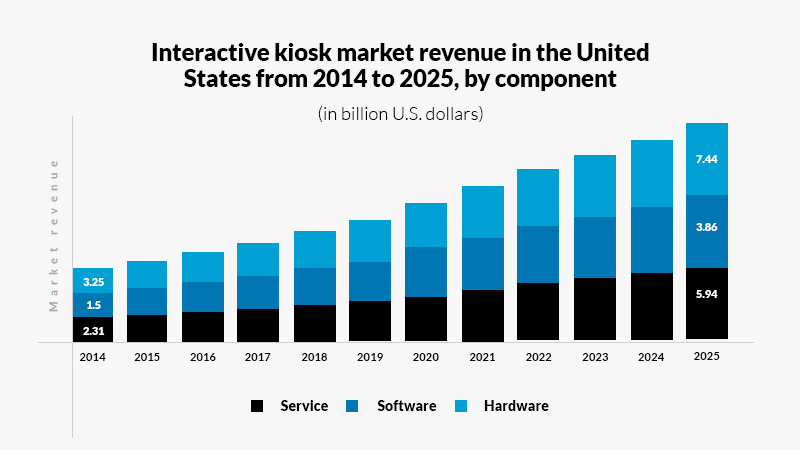
Source – Statista
With a CAGR of 6.9 percent, the interactive kiosk point-of-sale software development market is expected to reach a size of 45.32 billion US dollars in 2028.

Source – Statista
Streamlined Check-ins
By speeding up the check-in procedure, kiosks can decrease wait times and enhance patient flow. Patients can easily update their data, check in, and complete the required paperwork.
Reduced Administrative Burden
Kiosks reduce the administrative burden on staff by automating repetitive processes such as patient check-ins, information verification, and form completion. This frees up staff members to concentrate on other essential duties.
Improved Data Accuracy
Medical data entered electronically is less likely to contain errors than data entered by hand, which results in more accurate medical records and billing information.
Enhanced Patient Privacy
Compared to verbal communication at a reception desk, Interactive kiosks software for healthcare can give patients a more discreet means of providing sensitive information.
Also Read: Patient Privacy and Confidentiality in Healthcare – What is it and Why should we care?
Increased Patient Engagement
kiosks software can give patients more control over their healthcare experience by offering health advice, educational materials, and details about other services.
Cost-Effectiveness
Kiosks software can be an affordable alternative by eliminating the need for administrative workers and possibly increasing overhead expenses.
Improved Patient Satisfaction
Patient satisfaction can be significantly increased by cutting wait times and simplifying procedures. Patients typically find the check-in procedure more straightforward and less stressful when using kiosks.
Accessibility and Language Options
To accommodate a wide range of patient populations, kiosks healthcare software can provide several language options and accessibility features.
Real-Time Updates and Alerts
To keep patients informed, kiosks software for healthcare can offer real-time updates on appointment timings, delays, and other pertinent information.
Data Integration
Electronic health record (EHR) systems can be integrated with kiosks, guaranteeing real-time patient data updates across all platforms.
According to grand view research report, the worldwide medical kiosk point-of-sale software development market was estimated at USD 1.1 billion in 2021, and between 2022 and 2030, it is predicted to increase at a 14.8% compound annual growth rate (CAGR).
Customization and Branding
Healthcare providers can brand kiosks with logos and modify the user experience to fit unique requirements and work processes.
Wayfinding Capabilities
Maps and directions can be found on kiosks in large healthcare institutions, making it easier for patients and visitors to get about.
Feedback Collection
Instant patient feedback regarding their visit may be gathered with kiosks, and this information is beneficial for efforts to enhance quality.

Features of Kiosk Software for Healthcare!
Healthcare kiosk software is built with features that address the unique requirements of medical institutions, patients, and employees. Important characteristics frequently consist of the following:
 Patient Check-In
This feature lets patients rapidly confirm appointments, update personal data and agree to privacy policies.
 Form Completion
Patients can quickly complete and submit medical forms, surveys, and consent documents through the kiosk.
 Appointment Scheduling
It allows patients to plan, reschedule, or cancel appointments and see the available slots.
 Payment Processing
Facilitates processing payments for co-pays, unpaid bills, and other charges; frequently includes choices for entering credit card and insurance information.
 Real-Time Integration with EHR/EMR
Synchronizes patient data through seamless integration with Electronic Medical Records (EMR) or EHR systems.
 Wayfinding Features
It gives patients and guests digital maps and directions, making enormous healthcare facilities easier to navigate.
 Multi-Language Support
Provides a range of language choices to meet the needs of patients who don’t know English or would rather speak another language.
 Customizable Interface
Enables customization to meet the healthcare facility’s unique user interface needs and branding.
 Privacy and Security Compliance
Assures adherence to HIPAA and other regulations about healthcare privacy, safeguarding patient data with data encryption and secure logins. Hire a professional software development company to assist you in kiosk software development with regulations and reliability.
Also Read: Kiosk Software Development: All You Need to Know
 Health Information and Education
This section might show medical condition information, health advice, and other instructional materials.
 Accessibility Options
include voice commands, screen readers, and height-adjustable settings for people with disabilities.
 Alerts and Notification
Sends patients and employees real-time messages and alerts, such as wait time updates or appointment reminders.
 Feedback and Survey Tools
Patients can comment on their visit or fill out satisfaction questionnaires.
 Print Functionality
Allows patients to print documents such as appointment summaries, educational materials, or receipts.
 Remote Monitoring and Management
It enables healthcare administrators to monitor kiosk status and performance and manage content updates remotely.

Use Cases of Kiosk Software for Healthcare!
Kiosk enterprise solutions has many practical uses in the healthcare industry, significantly improving care quality and efficiency. Here are a few noteworthy use cases of kiosk software for healthcare:
Self-Service Registration
In clinics and hospitals, patients use self-service kiosks software for healthcare to check in, expediting the procedure and reducing wait times. This entails completing health questionnaires and confirming personal information and insurance data.
Scheduling and Managing Appointments
By allowing patients to make, change, or cancel appointments without assistance from personnel, kiosks increase administrative effectiveness.
Wayfinding in Large Hospitals
Interactive maps, or kiosks, are used in big healthcare institutions to direct patients and visitors to their destinations. This is especially useful in complex hospital layouts.
Prescription Refill Requests
Refill requests for prescriptions can be made at certain healthcare kiosks, saving patients from calling their pharmacist or scheduling extra appointments.
Bill Payments
Patients now have a simple and private option to handle financial transactions—they may view and pay their invoices using kiosks.
Patient Education
To encourage patient participation and awareness, interactive kiosks development frequently provide access to instructional materials and films about medical issues, therapies, and healthy living.
Patient Feedback and Surveys
Patients can use kiosks healthcare software to quickly provide feedback about their experiences after appointments, which gives healthcare professionals vital information to help them improve their offerings.
Telemedicine Stations
Certain kiosks are outfitted with telemedicine capabilities, enabling patients to consult virtually with medical experts. This is particularly advantageous in isolated or underprivileged regions.
Registration for New Patients
New patients can use kiosks software to complete their consent forms, registration forms, and other required paperwork to expedite the onboarding process.
Language Translation Services
Multilingual kiosks make it easier for people who don’t speak English as their first language and non-native speakers to access healthcare services.
Accessibility Features
Accessibility features on kiosks, like height-adjustable interfaces and screen readers, improve accessibility for disabled patients.
Health Screening Tools
Basic health screening instruments, such as blood pressure cuffs and heart rate monitors, are available for a fast examination at certain kiosks.
Emergency Alerts and Information
Kiosks can offer vital information and guidance in emergencies, like directing patients to the closest exit or safe spot.
Development Steps of Kiosk Software for Healthcare!
Several crucial processes must be taken while developing kiosk software for the healthcare industry to guarantee that it is safe, easy to use, and smoothly connects with current healthcare systems. Here’s a general how-to for creating healthcare kiosk software:
Needs Assessment and Planning
Determine the Needs: Determine what features are required by consulting with healthcare experts (e.g., check-in, wayfinding, information dissemination).
Recognize the demographics of users: Take into account the requirements of different user groups, including visitors, medical staff, and patients.
Design and User Experience (UX)
User-Friendly Interface:
- Create a user interface that is simple to use and intuitive, considering that not all users will be tech-savvy.
- Ensure the program has capabilities that allow users with disabilities to use it, such as voice commands, large print, and screen readers.
- Provide multilingual support with a variety of language choices for different user groups.
Software Development
Select the Appropriate Platform – Choose if you want the product to be a standalone application or web-based.
Safety and Adherence – Verify if the program conforms with US healthcare laws such as HIPAA to protect patient data.
Verify the software’s compatibility with the current EHR (Electronic Health Records) and other hospital administration systems, that’s why it’s beneficial to hire the best AI development company.
Testing and Quality Assurance
Verify that all features operate as intended by running functionality tests. Ask real users or hire healthcare software development company to test the software’s usability and provide feedback on the user interface. Security testing should be done thoroughly to protect patient data.
Maintenance and Updates
Frequent Updates – Upgrade the kiosk software for healthcare on a regular basis to ensure security, compliance, and functionality.
Technical Assistance – Assist users and medical personnel with continuing technical support.
Key Technologies and Tools
- Frontend Development – Technologies like HTML, CSS, JavaScript, and frameworks like React or Angular.
- Backend Development – Server, database, and application logic using languages like Python, Java, or .NET.
- Database – MySQL, MongoDB, PostgreSQL
- Cloud Services – Azure, GCP, AWS

Conclusion
Building kiosk software for the healthcare industry is a commitment to a future where healthcare is more readily available, efficient, and compassionate than it is merely a technical endeavor in this era of digital transformation services. Healthcare practitioners will indeed be able to concentrate on providing high-quality care while patients will have more power and administrative responsibilities will be reduced in the future thanks to the continuous development and improvement of kiosk software.
Frequently Asked Questions (FAQs)
[sp_easyaccordion id=”43079″]